OK, I’ve been sleeping and haven’t made a backup before starting the FS gramplet.
OK stupid me, and now I have a multitude of labels that I can’t remove.
goto menu edit > lables > organize lables. The full list appears, Click an item, click delete > click yes. Do the whole list. Clicking close the list, but as soon I open the organize lables again the lables reappear.
Is there a way to undo what that gramplet has done? Or loose todays work.
AIO64-6.0.3–1 Win11
Try quitting Gramps and restarting it. (I assume you’re speaking of Tags in the English version.) But do any restart immediately after editting in the Organize Tags dialog. Don’t give it a chance to rebuild the list from cached data.
Some lists do not refresh as well as they should.
OK that did work.
Almost.
The FS tags are all gone
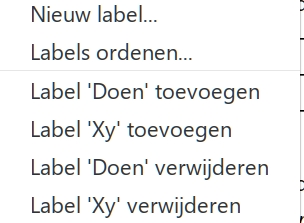
Now the two tags I previously had are doubled into four. It lets me add the tags through the main menu, although the person (in this case) already has that tag. (Or vice versa remove a tag from a person that has no tags currently)

Try renaming Tags so that they are different from one another. Then restart Gramps.
Then try Removing the tags.
So if some of the Remove features use the text label instead of the index, then it might be a workaround.
When going into the organize window there are only two items. The ‘X’ and the ‘Doen’ (ToDo). But in the menu are four, as shown. After renaming there are now two items with the new name. I get the warning that all existing tags will be removed. Which I would rather not have.

This topic was automatically closed 30 days after the last reply. New replies are no longer allowed.