Here’s an example of the report (Menu → Reports → Diagrams → Relational Graph… then in the options (tab ‘Report Options’), the filter ‘Descendant Families of…’ with ‘…’ being the currently active person in the family tree).
In the ‘Include’ tab, check x Show all family nodes and make sure the filter on dates and locations (list just above) includes the desired data.
Finally, for rendering, try adjusting according to the result and your data, using the ‘GraphViz Layout’ and ‘GraphViz Options’ tabs (at the end, to the right in the list of top tabs).
Regarding GraphViz, I believe the Windows installer for Gramps already includes a version of GraphViz, specifically to enable the use of reports and views that rely on this library. By “options that don’t appear”, do you mean the reports window? Actually, there are so many tabs that you need to scroll through them (and click on them) to access all the categories of options (bold tabs) and the small arrows on the left and right.
P.S.: The keyboard arrows also allow you to navigate within the top tabs (option categories).
I don’t have a GraphViz tab (I only installed graphviz; perhaps I need to do something else to make this tab appear? I restarted Gramps, but it’s still the same)
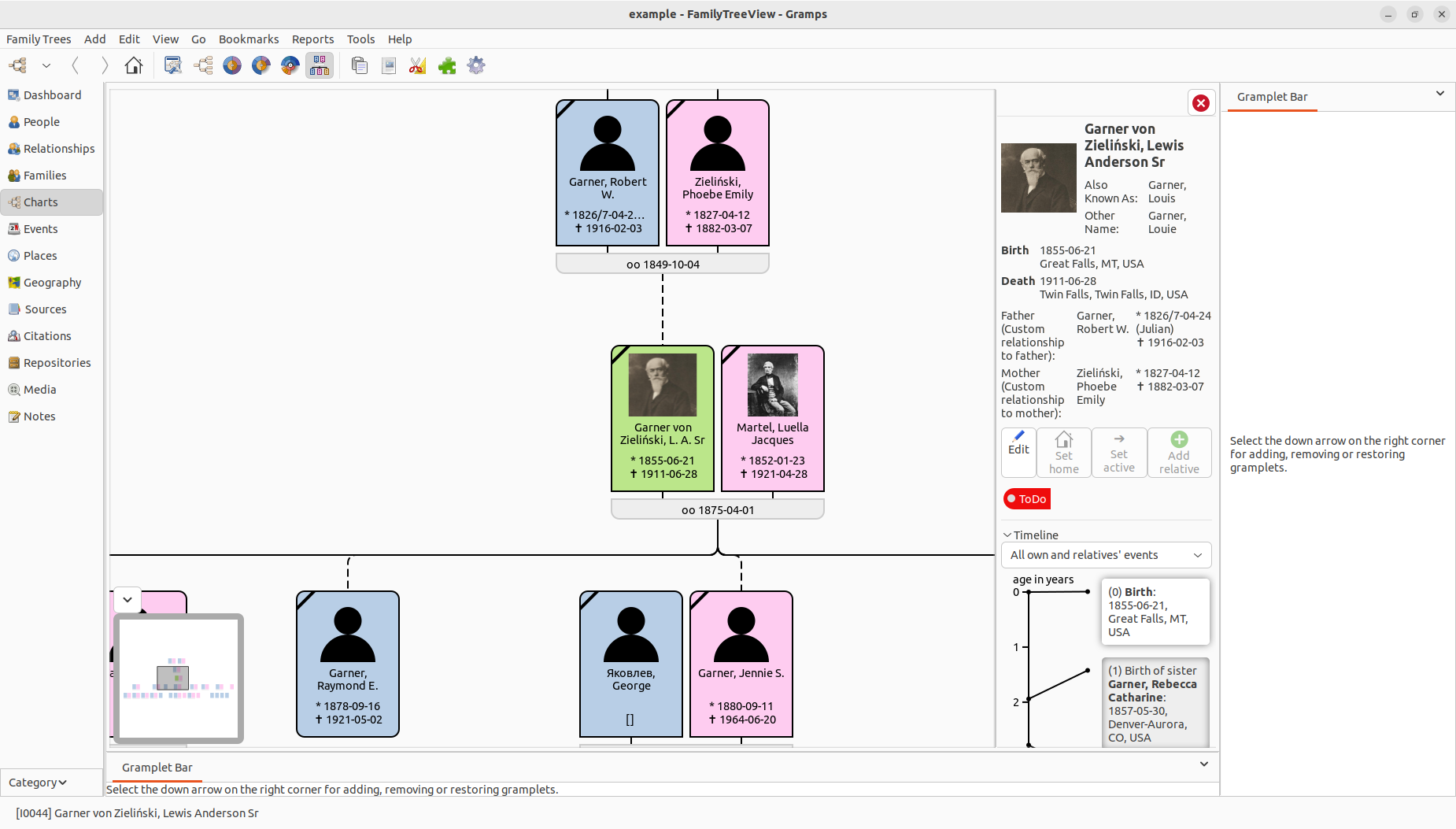
@Laura Another approach to think about is to install an addon called ‘Family Tree View’. It’s technically still in beta but it is very stable. Once installed it appears in Gramps as a Chart View. It has many configurable options. You can also export what the view is displaying in SVG format, which you can then print to paper / PDF file using a suitable SVG file viewer.
To install FTV you need to follow the instructions here:
To those nine installation steps I’d add a tenth:
10. Close and reopen Gramps before you try to switch to the Charts View and select the FTV view.
I find FTV invaluable, using it in Gramps v6.0.6 on both Windows 10 and 11.
No, FTV doesn’t change any of the Reports in Gramps. As @romjerome has shown, it is a Charts View and an associated Gramplet. When you are in that view, you can explore the extensive configuration options via the icon that is the third icon to the right of the Home icon in this screen shot:
Assuming you can configure the View to be as you require, you can then Export what you see on screen to an SVG file by clicking on the second icon to the right of the Home icon in the above screen shot. The SVG file can be opened with a suitable SVG viewer, e.g. IrfanView and from there it can be edited / printed / converted to PDF.
Don’t bother with the print option (first to the left of the Home icon) in FTV. It doesn’t work as expected in the Windows version.
Unfortunately, I am encountering an error message with the descendant family tree:
360698: ERROR: _reportdialog.py: line 800: Failed to run report.
Traceback (most recent call last):
  File "C:\\Program Files\\GrampsAIO64-6.0.6\\gramps\\gui\\plug\\report_reportdialog.py", line 759, in report
    my_report.write_report()
  File "C:\\Program Files\\GrampsAIO64-6.0.6\\gramps\\plugins\\drawreport\\descendtree.py", line 1453, in write_report
    self.canvas.paginate(colsperpage, one_page)
  File "C:\\Program Files\\GrampsAIO64-6.0.6\\gramps\\plugins\\lib\\libtreebase.py", line 566, in paginate
    self.__paginate(colsperpage)
  File "C:\\Program Files\\GrampsAIO64-6.0.6\\gramps\\plugins\\lib\\libtreebase.py", line 549, in __paginate
    self.__paginate_title(x_page_offsets)
  File "C:\\Program Files\\GrampsAIO64-6.0.6\\gramps\\plugins\\lib\\libtreebase.py", line 536, in __paginate_title
    self.__pages[0, 0].add_box(self.title)
~~~~~~~~~~~~^^^^^^
KeyError: (0, 0)
Could you please copy your options for this report?
For example, by copying a portion of your file C:\Users\<username>\AppData\Local\gramps\report_options.xml, at the line <module name="descend_chart">. It should look something like this:
In the graphical report, Descendant Tree..., there is a checkbox (or uncheck box) under Display. The same applies to the Descendant Family Tree... report.
Ah, there was a “customization” (customisation/customization) of the report name! Was this an error during copying, or are you trying to improve the code by using a copy named “descend_chart ZAOUI DARMON” (this is the identifier used to identify the code of this report in Gramps, it should keep an original name, common to all users: “descend_chart”)? I’ll assume there was a misstep during copying in this post.
Your copied options should theoretically have allowed reproducing the bug with your configuration. That’s not happening. Something in your data has triggered:
File “C:\Program Files\GrampsAIO64-6.0.6\gramps\plugins\lib\libtreebase.py”, line 536, in __paginate_title
self.__pages[0, 0].add_box(self.title)
Testing with the Gramps 5.2.x branch: could this be specific to the 6.0.x branch?
Your data might contain a record that reproduces this error. It would be interesting if you could find out with whom in your tree this occurs and with whom it does not. For example, if you “descend” one generation, is the bug still present?
Perfect! You’ve successfully made the copy, which will make it easier to reproduce this bug “with your chosen options” for this report (checked boxes, values, display options, paper size and format, etc.)


 could this be specific to the 6.0.x branch?