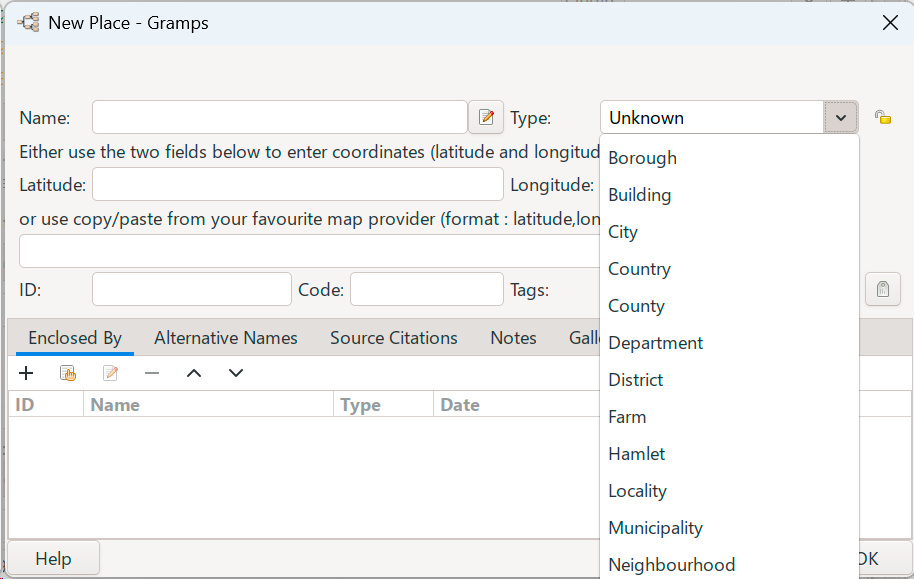
I have a problem with the type of locatilns list (city, town, state, etc.): they don’t appear in alphabetical order. This is quite annoying when looking for a certain entry.
Is there a way to sort this list? I couldn’t find a way.
Except when Gramps stops doing that. I don’t know if that is when the list grows too large or there is some other reason. But my Place Type list hasn’t filtered like that for years. And the Surname suggestion-as-you-type on happens occassionally. As in occasions like, once in a blue moon.
On 5.2.4 which is what I still use. Place Types fall into two groups
1st group Pre-installed Types all sorted in alphabetical order
Double Space
2nd Group Custom Types all sorted in alphabetical order
I have done nothing with this order or delete unused Types over many years.
phil
In my experience, the built-in types are listed first in alphabetical
order and then the custom types are listed in alphabetical order below
those. However, for me it has always worked to type in the first
character(s) and get the matching types, both built-in and custom. This
has been true for many versions of Gramps over several years. I use
Kubuntu and I am currently using Gramps 6.0.4 because that is the most
recent .deb package I’ve found and I haven’t had a reason to figure out
how to install from source.
Somehow I didn’t recognize, that the list is sorted by pre-built and custom ones.
In my case, both are listed in alphabetical order, but not seperated by double space, like phil mentioned.
Sorting the list by typing the first letter(s) works fine so far. I will see how long it works…
Aditionally the question if it’s possible to delete an item? In my case there is an double entry (“Bezirk”, strangely in the pre-built list…) and I would like to get rid of one.