Issues Importing Media to Gramps-Web

I am standing up Gramps Web for the first time. I am running from a Docker on ZimaOS. I have the database imported, but keep running into issues when importing the media.

I have exported the media from my Gramps Desktop application, (as a gpkg file and then extracted the media files)

When I go to upload I am told it is successful (Green check in the UI & the Logs have: gramps_webapi.api.tasks.import_media_archive[dada69e3-f266-409a-9a13-4ad104bed6e4] succeeded in 0.546123358013574s: {‘missing’: 1000, ‘uploaded’: 1, ‘failures’: 0}
This was a single image test.
However, the file is not in the Media folder, and of course it doesn’t show up in the person’s profile.

I’m about at the end of what I can troubleshoot. Any ideas?

Gramps Web:

Gramps 6.0.4
Gramps Web API 3.3.0
Gramps Web Frontend 25.9.0
Gramps QL 0.4.0
Sifts 1.0.0
locale: en
multi-tree: false
task queue: true
OCR: true
chat: false

Gramps Desktop:

6.0.5

Python: 3.13.7
sqlite: 3.47.2
orjson: 3.11.3
LANG: en_US.UTF-8
OS: Linux
Distribution: 6.16.8-200.fc42.x86_64

In order to be able to sync images between Gramps Desktop and Gramp Web, you need to switch from absolute path to relative path. Use the Tools -> Utilities -> Media Manager and select ‘Convert paths from absolute to relative’.

I’m not actually syncing, I’m importing. I’ve tried both however and get the same result. Even despite changing to relative paths. The media never actually imports despite reporting success

Hi, have you checked the comments about checksums etc. here?

I have not, but per the import of the database no files are missing checksums. The problem is that it says the import is successful but no media files are present.

It’s worth noting that if I upload directly from the web interface everything works as expected. It’s only if I import or sync.

Are all media paths relative?

I ran the media tool to convert them. But now that I’m thinking about it, I did that after I imported the database. I’ll redo that and let you know.

Okay, I removed the Gramps-Web database, and then on Gramps Desktop ensured that I had all media paths as relative and I did a fix/repair database (no issues found). I then exported and imported the database into Gramps-Web without issue.

I attempted a single image import which says it was successful

gramps_webapi.api.tasks.import_media_archive[e45b2556-c91d-410b-9b7e-d844d26723ba] succeeded in 0.627874179976061s: {'missing': 1000, 'uploaded': 1, 'failures': 0}

However, the same issue existed. No images actually uploaded. I then went to Gramps Desktop and attempted a sync. It as well said successful:

But again, no media actually uploaded.

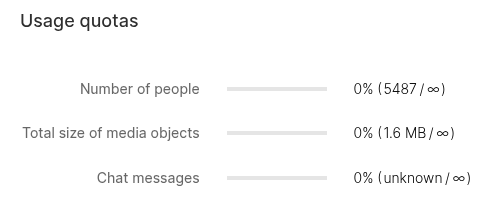
As a side note, The Usage Quota shows a media object size of 1.6 MB even though I don’t see the media:

My guess is that you have an error in your compose file – which you did not share – which causes the Web API container and the Celery container to not both have access to all required volumes (media, cache, etc.), so one of the cotainers writes the files and says all is well and the other container doesn’t see them.

name: picturesque_jacob
services:
  grampsweb:
    cpu_shares: 90
    command: []
    container_name: grampsweb
    depends_on:
      grampsweb_redis:
        condition: service_started
        required: true
    deploy:
      resources:
        limits:
          memory: 16653418496
        reservations:
          devices: []
    environment:
      - GRAMPSWEB_ALLOW_REGISTRATION=true
      - GRAMPSWEB_CELERY_CONFIG__broker_url=redis://grampsweb_redis:6379/0
      - GRAMPSWEB_CELERY_CONFIG__result_backend=redis://grampsweb_redis:6379/0
      - GRAMPSWEB_EMAIL_VERIFICATION=false
      - GRAMPSWEB_RATELIMIT_STORAGE_URI=memory://
      - GRAMPSWEB_SECRET_KEY=REDACTED
      - GRAMPSWEB_TREE=Emmert
      - PGID=1000
      - PUID=1000
      - UMASK=002
    image: ghcr.io/gramps-project/grampsweb:latest
    labels:
      icon: https://gramps-project.org/wiki/images/b/b1/Gramps-genea.png
    ports:
      - target: 5000
        published: "8181"
        protocol: tcp
    privileged: true
    restart: unless-stopped
    volumes:
      - type: bind
        source: /DATA/AppData/gramps1/media
        target: /app/media
      - type: bind
        source: /DATA/AppData/gramps1/db
        target: /root/.gramps/grampsdb
      - type: bind
        source: /DATA/AppData/gramps1/users
        target: /app/users
      - type: bind
        source: /DATA/AppData/gramps1/index
        target: /app/indexdir
      - type: bind
        source: /DATA/AppData/gramps1/thumbcache
        target: /app/thumbnail_cache
      - type: bind
        source: /DATA/AppData/gramps1/cache
        target: /app/cache
      - type: bind
        source: /DATA/AppData/gramps1/secret
        target: /app/secret
      - type: bind
        source: /DATA/AppData/gramps1/tmp
        target: /tmp
    devices: []
    cap_add: []
    networks:
      - grampsweb
  grampsweb_celery:
    cpu_shares: 90
    command:
      - celery
      - -A
      - gramps_webapi.celery
      - worker
      - --loglevel=DEBUG
      - --concurrency=2
    container_name: grampsweb_celery
    depends_on:
      grampsweb_redis:
        condition: service_started
        required: true
    deploy:
      resources:
        limits:
          memory: 16653418496
        reservations:
          devices: []
    environment:
      - GRAMPSWEB_ALLOW_REGISTRATION=true
      - GRAMPSWEB_CELERY_CONFIG__broker_url=redis://grampsweb_redis:6379/0
      - GRAMPSWEB_CELERY_CONFIG__result_backend=redis://grampsweb_redis:6379/0
      - GRAMPSWEB_EMAIL_VERIFICATION=false
      - GRAMPSWEB_RATELIMIT_STORAGE_URI=memory://
      - GRAMPSWEB_SECRET_KEY=REDACTED
      - GRAMPSWEB_TREE=Emmert
      - PGID=1000
      - PUID=1000
      - UMASK=002
    image: ghcr.io/gramps-project/grampsweb:latest
    labels:
      icon: https://gramps-project.org/wiki/images/b/b1/Gramps-genea.png
    privileged: true
    restart: unless-stopped
    volumes:
      - type: bind
        source: /DATA/AppData/gramps1/media
        target: /app/media
      - type: bind
        source: /DATA/AppData/gramps1/db
        target: /root/.gramps/grampsdb
      - type: bind
        source: /DATA/AppData/gramps1/users
        target: /app/users
      - type: bind
        source: /DATA/AppData/gramps1/index
        target: /app/indexdir
      - type: bind
        source: /DATA/AppData/gramps1/thumbcache
        target: /app/thumbnail_cache
      - type: bind
        source: /DATA/AppData/gramps1/cache
        target: /app/cache
      - type: bind
        source: /DATA/AppData/gramps1/secret
        target: /app/secret
      - type: bind
        source: /DATA/AppData/gramps/tmp
        target: /tmp
    ports: []
    devices: []
    cap_add: []
    networks:
      - grampsweb
  grampsweb_redis:
    cpu_shares: 90
    command: []
    container_name: grampsweb_redis
    deploy:
      resources:
        limits:
          memory: 16653418496
        reservations:
          devices: []
    image: redis:7.2-alpine
    labels:
      icon: https://gramps-project.org/wiki/images/b/b1/Gramps-genea.png
    privileged: true
    restart: unless-stopped
    ports: []
    volumes: []
    devices: []
    cap_add: []
    environment: []
    networks:
      - grampsweb
networks:
  grampsweb:
    name: grampsweb
x-casaos:
  author: self
  category: self
  hostname: REDACTED
  icon: https://gramps-project.org/wiki/images/b/b1/Gramps-genea.png
  index: /
  is_uncontrolled: false
  port_map: "8181"
  scheme: http
  store_app_id: picturesque_jacob
  title:
    custom: Gramps
    en_us: grampsweb_redis

Here you go. I am running this on ZimaOS.

Did you use AI to generate this? GRAMPSWEB_EMAIL_VERIFICATION is a hallucinated config option that doesn’t exist.

Otherwise, I don’t see any obvious mistakes, but it’s quite far from our documented examples, and I can’t review every part of it.

For the volumes, they look good to me, but you can try exec-ing into the celery container, creating a file in /app/media/, and check if you see it in the other container.

Yes, part of it was AI created during my own troubleshooting attempts. I’ll check visibility and may take it back to baseline and start from scratch.

Okay, I reverted to the basic yaml. Only changes were:

  • Port 80>8181 due to a conflict
  • Network bridge>grampsweb (only way I could get it to let me log in

I reimported the database after running a fix & repair (again) and making sure that all media paths were relative.

I also verified that grampsweb & grampsweb_celery are able to see into each other

I still have the same issue however. Media says it uploaded, but then doesn’t show. I tried to setup sync and I noticed that it says the media is missing locally (even though I can see it) so I’m wondering if that might be the culprit.

Let’s focus on one thing, the upload, and ignore the sync to not complicate things.

You inititally shared this: {‘missing’: 1000, ‘uploaded’: 1, ‘failures’: 0}

This means 1000 files are missing, but only a single file of the ones in the ZIP file matched the checksum of a file in the database.

Are you 100% sure your checksums are right, the paths are relative and you still get only one success?Since

After my last message I went ahead and ran the sync again after fixing the missing files. Now the sync worked and the images are showing in Gramps Web. I’m not sure if the import is working. If needed I can setup another db to test. But it looks like my immediate issue is fixed.