Windows 10, Version AIO64-6.0.4–1 Recently, each time I open gramps I have to break the lock even though I close properly. The repair button is grayed out. Info shows it was last accessed Feb. 2 which is not true and it says it is locked. I noticed it seemed to back up too quickly when I shut it down so I investigated and see that the last time it shows the proper size, 6,186KB is Feb. 2. On Feb 6 it shows 864 KB and the last 4 closes show 0 KB but the person I just added is there so that is confusing. Anyway, I don’t know if I should back up, open the save from before this started, which is 6KB smaller, update, or something else. If it matters, I always choose all addons for addition or updating.
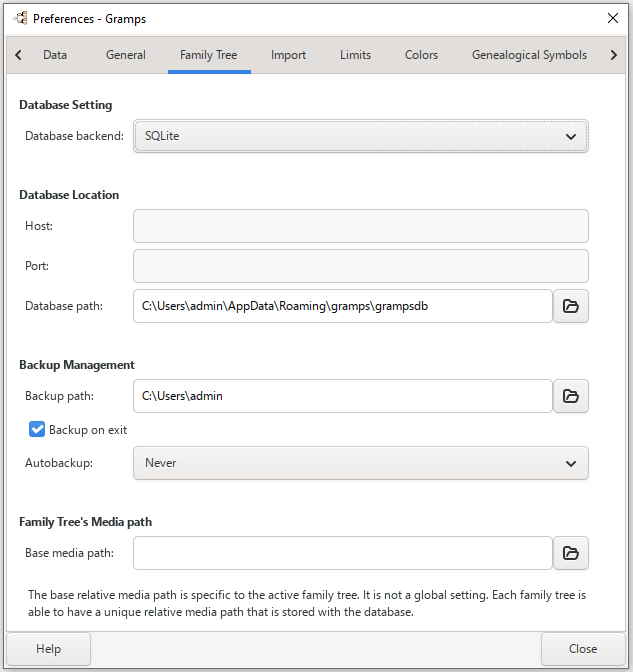
Thank you, emyoulation. I haven’t changed anything and yes, I have full rights to both locations. I back up to a thumb drive, just to be safe if my computer dies. When I looked inside the grampsdb folder, I noticed a file named lock. Should that be there? The program is open currently
There should be a file named lock whenever Gramps is running with that particular Tree loaded. It is a text file and the contents should be the name of the user and domain that currently has that Tree loaded.
However, a lock file should not be in the grampsdb folder, it should be 1-level deeper… in the folder named with the hexadecimal ‘handle’ of the loaded tree.
As an example, the Path in the Info for one of my experimental trees is:

So the lock file is in:
/home/districtsupport/.gramps/grampsdb/698c9d74
Yes, mine is in a level deeper too, C:\Users\Owner\AppData\Roaming\gramps\grampsdb\688fda4c
Is there any chance that you are launching Gramps from a command prompt window? Because if you terminate the console window (with the console’s Close gadget) then Gramps will be terminated abnormally as its parent window closes.
I would start by doing a manual, no media, backup. Then do a database Check and Repair. This may alert you to the unknown issue. Do a regular shutdown with its backup.
Re launch Gramps to see it remained locked.
Regardless, I would create a new database and import your best backup. Hopefully it is the backup after the C&R. If not it may be the backup from 2 Feb.
No, emyoulation. I’ve been starting it with a double click on the desktop icon.
DaveSch, I’ll try that and report back. Thanks.
A question I feel silly asking… you still have sufficient excess space on the C: drive?
Not silly at all but yes, I still have lots of room. It’s memory that is starting to be a problem, I’m such a multitasker. Not sure what to do now. It’s been attemping the back up for over 15 minutes and still acts like it’s backing up. Should I just click the x to stop it? Maybe I need to rename the ini file so it can make a new one.
ETA: I had to use task manager to force close gramps because it wouldn’t finish backing up and I couldn’t stop the attempt with the x. I tried again to back up but same result.
Here are a few things to check to resolve and prevent database lock issues:
-
Antivirus Exclusions: If you use 3rd-party antivirus software, add the
grampsdbfolder to the “Exclusion” or “Do not scan” list. SQLite databases can become locked or even corrupt if an AV-scanner tries to access the file at the exact moment Gramps is writing to it. -
Check for Hanging Processes: When you close Gramps, open the Task Manager (Ctrl+Shift+Esc). Ensure that
gramps.exeorgrampsw.exeare completely closed. If they are still visible in the “Processes” or “Details” tab, right-click them and select “End Task” or “End Process Tree”.-
Tip: After ending the tasks, restart Gramps, break the lock if prompted, close the database (but keep Gramps open), then close Gramps again and verify in Task Manager that the processes stay closed.
Note: In some cases, it can take a little time before the database is actually written to and closed properly. If you try to restart Gramps too quickly, you might encounter a lock error because the previous session hasn’t finished its cleanup. This is also true if the Gramps process is hanging for any other reason; the database can be kept as “open” by the lingering process.
-
-
Disable Cloud Syncing: If your database is stored in a OneDrive, Dropbox, or other cloud-synced folders, move it to a local folder instead. SQLite does not handle active cloud syncing well, as the sync client often locks the file while Gramps is using it. If you must use cloud storage, set it to “manual sync” only so it doesn’t sync while Gramps is running.
These steps should resolve the lock issues in addition to the standard recovery methods.
Thank you StoltHD
1- I added the exclusion to Windows Defender.
2- No hanging processes, either with db open or closed.
3.- I don’t use OneDrive, etc.
I opened the db and closed but it didn’t attempt to back up as it should. I attempted a manual back up and it is still stuck. I must have broken it somehow. I’m tired so will pick this up again in the morning. Have a lovely evening.
When you pick it back up in the morning:
Your next step is to make a copy of the Database folder (a crude bandage for when the database is damaged and you cannot make a proper backup before doing more risky repair attempt.)
Then use the Tools → Check and Repair Database to repair the corruption in the Tree.
(This tool is also accessible from the Tools Selector from the Toolbar.)

Given that the database filesize is MUCH smaller than previously noted, it is likely that there was extensive data loss in any repaired tree.
Check the repaired tree for changes that you recall making recently. But if it has some recent data, it could be worth some patchwork techniques for joining the most recent good backup with the lossy tree. You will have to make an assessment about the amount of lost work and recoverable work. justifies that.
Good morning, Emyoulation. Although the recent backup attempts were little to 0KB, the database had been saving my new work just fine. I ran the tool and other than a few missing objects, which were likely my own mistakes, everthing looks fine. Here are the results.
Integrity Check Results
1 place alternate name fixed
6 media objects were referenced, but not found
6 missing media objects were removed
5 events were referenced, but not found
5 empty objects removed:
0 person objects
0 family objects
5 event objects
0 source objects
0 media objects
0 place objects
0 repository objects
0 note objects
I attempted a manual back up but still not finishing so I force closed it. Just in case it is important, a meta_data.db file was created within the grampsdb folder named 688fda4c when I closed down at 8:31 last night and the size is 0KB, as well and a lock file created this morning when I opened it at 65:35am and is still there after force close. The database size is 151,060 KB as of the force close. It was 151,056 before the repair tool. I reopened after breaking the lock and I’ve noticed it isn’t going back to where I left off as usual. It also isn’t attempting a backup before normal close. I assume I may need to reinstall and could move to the latest version but I will wait to be instructed to do so. There have been no changes I can think of other than updating plugins so I wonder if that could be behind this. I can’t tell you which updates or additions because I always just choose all.
Is the Backup being done WITH media or Excluding it? Please try excluding for your backup.
I find the Media Management to be too burdensome if using Media extensively. And for at least one media feature (the evince thumbnail generation for PDFs), the Media overhead can cause timeouts. (a 12.6 Mb PDF single page scan of the 1950 US census causes an endless loop of failure messages: evince-thumbnailer couldn't process file: 'file:///home/districtsupport/Documents/GrampsMedia/1950HousingSched.pdf' Reason: Took too much time to process.)

I rarely back up with media, so the backup attempt is without media and so is the backup that was done before problems started.
@Nick-Hall @SNoiraud @dsblank
Assuming that trying to include Media for the Backup Upon Exit preference option is not the root culprit…
Then the Check and Repair Database is not finding and fixing a critical corruption. Perhaps one of you would like to examine a copy of the folder with SQLite .db file? And discover what that tool could be enhanced to repair?
If it matters, when I open and close without adding anything, it closes fine, no attempted new backup and the lock file disappears. But, when I just added a photo, there is no new backup it closed normally and the lock file stays.
You might want to import your 2 Feb backup into a new database and run the C&R on it to see if the same missing records are found. Are these errors long standing or are they only found after 2 Feb.
Another thing to try is doing a full database EXPORT. I would try the SQLite option first and do the same with GRAMPS XML (family tree) option. If either of these works, it may give you the best option to then import for your new master database file.
You may want to do a re-install of 6.0.4 or an upgrade to 6.0.6.